
Kids love tablets. They use them for games, schoolwork, and watching their favorite videos. However, a child’s tablet faces a lot of danger every day. Drops, scratches, spills, and cracked screens are very common.
According to device insurance reports, screen damage accounts for nearly 60% of tablet repairs worldwide. At Brothers Wireless, we repair hundreds of cracked tablets every year. Most damage happens because kids use devices without protective cases.
Without the right care, tablet repairs get expensive fast. This guide will show you how to protect kids’ tablets easily. You don’t need to be a tech expert to keep these devices safe.
How Do You Protect a Child’s Tablet?
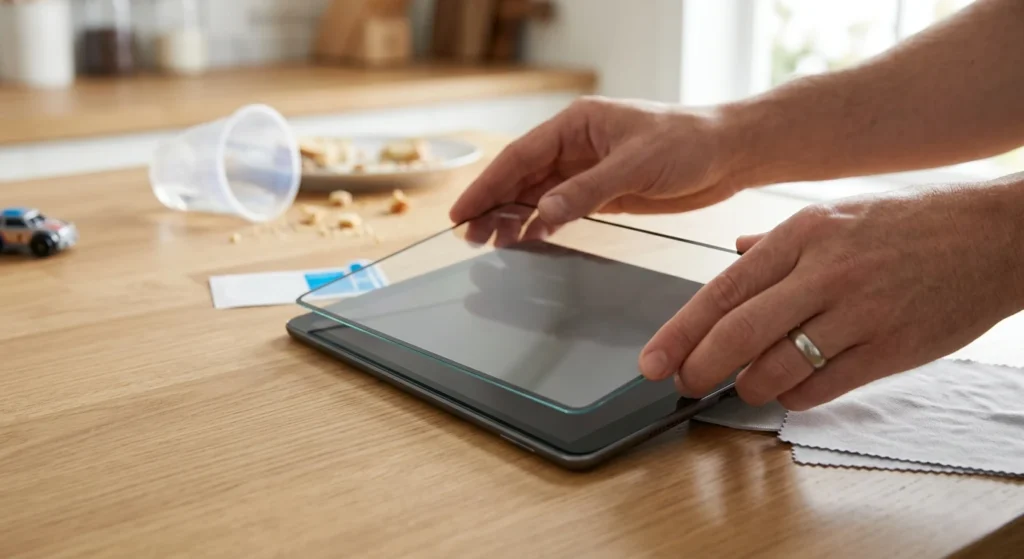
To keep your child’s tablet safe effectively, use a three-layer defense. Combine a shockproof EVA foam case with a tempered glass screen protector. Finally, enforce strict “sitting only” usage rules. This strategy prevents 90% of common screen cracks and liquid damage.
Why Kids’ Tablets Get Damaged So Easily
Children interact with technology differently from adults. Statistics show that children drop devices 3× more than adults. Understanding these patterns helps you prevent accidents before they happen.
Kids Drop Tablets More Often
Children are always on the move. They often use tablets while walking, playing, or sitting on the floor. Their grip isn’t as strong as ours. This makes accidental slips very likely.
Food and Liquid Spills
Tablets often end up near the snack bowl. Juice, sticky snacks, and greasy fingers are a nightmare for touchscreens. Over time, spills can seep into ports and cause internal damage.
Rough Handling During Games
Games can be intense! Excited tapping, fast swiping, and sudden movements can send a tablet flying across the room.
Best Tablets for Kids That Are Easy to Shield
Not all tablets are built the same. Some are easier to shield than others.
Protecting an iPad Used by Kids
iPads are sleek but fragile. Because they are expensive, tablet protection for kids is critical here. Always use a case that covers the corners. These are the weakest points of an iPad.
Amazon Fire Kids Tablet
These often come with a “kid-proof” case included. They are built for rough handling. However, adding an extra screen protector is still a smart move for scratch prevention.
Samsung Galaxy & Android Tablets
Android tablets come in many sizes. Make sure you buy a case specifically for your model. A loose case will not protect the device during a drop.
Use a Kid-Proof Tablet Case (Most Important Protection)
If you want to protect a child’s tablet, a high-quality case is non-negotiable. It is the first line of defense against gravity.
Shock-Absorbing Design
Look for cases made of thick foam, rubber, or silicone. These materials absorb the impact when the device hits a hard floor.
Raised Screen Edges
A good case should have “lips” or raised edges. If the tablet falls face down, the raised edge hits the ground instead of the glass.
Non-Slip Grip
Choose a case with textures or handles. This makes the device much easier for small hands to hold securely.
Pro Tip: Always choose heavy-duty kids’ tablet cases specifically designed for “rugged” use.
Essential Tablet Accessories for Kids
The right gear makes kids’ tablet safety much easier to manage.
- Best Kids’ Tablet Case: Look for EVA foam cases with large handles.
- Tempered Glass Protector: Offers the best defense against impact.
- Tablet Stand: Reduces the need for kids to hold the device.
- Kids’ Stylus: Keeps sticky fingers off the actual screen.
- Waterproof Sleeve: Great for travel or trips to the park.
Install a High-Quality Screen Protector
A screen protector is essential for tablet protection for kids. It acts as a sacrificial layer for your device.
Prevents Scratches
Kids sometimes use toys or pencils on the screen. A protector stops dirt and sharp objects from leaving permanent marks.
Reduces Screen Crack Risk
Tempered glass protectors act as a shock barrier. If the tablet falls, the protector might crack, but the actual screen underneath stays safe.
Saves Expensive Repairs
Replacing a screen protector costs very little. Fixing a cracked tablet screen can cost almost as much as a new device.
Tablet Repair Cost vs. Protection Cost
Google loves a smart shopper. Look at how much you save by protecting your device early.
| Item | Average Cost |
| Professional Screen Repair | $120 – $250 |
| New Charging Port | $70 – $100 |
| High-Quality Kids Case | $15 – $40 |
| Tempered Glass Protector | $10 – $15 |
Investing $30 now can save you over $200 later!
Common Tablet Accidents Kids Cause
- The “Sit-On”: Kids often leave tablets on sofas. Avoid this by having a “Tablet Home” shelf.
- Cable Snap: Kids trip over charging cables. Use a magnetic charging cable that snaps off easily.
- Water Spills: Never allow drinks within three feet of the device.
Enable Parental Controls for Safer Tablet Use
Did you know parental controls actually improve child tablet protection? It’s about physical safety, too.
With parental controls, you can:
- Limit screen time: Prevents the device from overheating.
- Block unsafe content: Keeps the software environment clean.
- Control downloads: Prevents malware that can slow down the device.
Create a Safe “Tablet Zone” at Home
Setting boundaries is a great way to prevent screen damage. Establish a designated “tech area.”
- Charge on a desk: Never charge tablets on a bed where they can overheat.
- No-Food Zones: Keep tablets away from the kitchen table.
- Stay Dry: Keep tablets far away from bathrooms.
Teach Kids Simple Tablet Safety Habits
Hardware is only half the battle. Children should learn basic care.
Teach your kids these four rules:
- No Running: Never run while holding a tablet.
- Clean Hands: Wash your hands before using the device.
- The Two-Hand Rule: Always carry the device with both hands.
- Safe Storage: Put the tablet back in its “home” after use.
Mistakes Parents Make That Damage Kids’ Tablets
Even with good intentions, parents often make these mistakes:
- Using cheap, thin cases: These look cute but offer zero drop protection.
- Charging in bed: This leads to overheating and damaged charging ports.
- Skipping the protector: Thinking the case is “enough” until a toy hits the screen.
- Allowing snacks nearby: Sticky residue ruins touch sensitivity over time.
When Should You Repair a Damaged Tablet?
Signs you need a repair immediately:
- Cracked Screen: Sharp glass can hurt small fingers.
- Touch Not Responding: The tablet becomes frustrating.
- Battery Draining Fast: The device dies too quickly.
- Charging Issues: You have to “wiggle” the cable.
If your child’s device already has damage, professional tablet screen repair services can restore the screen quickly if your device is already damaged. We also specialize in iPad repair and phone repair for all major brands.
Expert Tips to Protect Kids’ Tablets Long-Term
Take your protection to the next level with these expert insights:
- Use textured cases: Smooth cases slip easily from small hands. Textures provide a better grip.
- Avoid charging while gaming: Playing heavy games while plugged in creates heat. Heat damages batteries and internal parts faster.
- Use a sleeve for backpacks: Never throw a tablet in a backpack with books. Pressure from heavy books can crack the screen. Use a padded sleeve for extra safety.
How to Maintain Kids’ Tablets for Long-Term Use
Regular care keeps a device running like new.
- Clean screens weekly: Use a soft microfiber cloth to remove oils and germs.
- Check charging ports: Ensure they stay free from dust, lint, or food crumbs.
- Update software regularly: This keeps the tablet fast and secure from glitches.
- Avoid overheating: Never charge the tablet on a pillow or blanket.
How Long Should a Kid’s Tablet Last?
A well-protected tablet can last three to five years, depending on usage. Devices used for school and entertainment face more wear. However, using a shockproof case, tempered glass protector, and safe charging habits significantly extends their lifespan.
Quick Checklist to Protect Kids’ Tablets
✔ Use a shockproof EVA foam case
✔ Install tempered glass immediately
✔ Enable parental time limits
✔ Create a dedicated charging station
✔ Teach the “Two-Hand” carrying rule
Final Thoughts
Keeping your kids’ tablets safe doesn’t have to be difficult. You don’t need a huge budget to keep things safe. Tablets are powerful learning tools, but they are also fragile.
A few simple protection steps today can save parents hundreds of dollars in repairs tomorrow while keeping their child’s learning device safe.
If you need help, Brothers Wireless is here. Our expert technicians provide fast and affordable tablet screen repair. Visit us at our Walmart and Columbus locations today!
FAQ
How do I protect my child’s tablet from breaking?
The best way is to use a high-quality shockproof case and a tempered glass screen protector. Combine this with teaching your child safe handling habits.
What is the best case for kids’ tablets?
A thick silicone or EVA rubber case is best. Ensure it has a “shock-absorbing” design and raised edges.
What is the safest tablet case for kids?
The safest tablet cases for kids are thick EVA foam or silicone shockproof cases with raised edges and built-in handles. These cases absorb drop impact and make it easier for small hands to hold the device securely.
Should kids use screen protectors on tablets?
Yes, absolutely. Screen protectors are the cheapest way to prevent scratches and expensive screen damage.
Can tablets be repaired if the screen cracks?
Yes. Professional repair shops like Brothers Wireless can replace cracked tablet screens quickly. It is much cheaper than buying a new device.
How do kids break tablets most often?
Kids break tablets most often by dropping them while walking or running. Other common causes include stepping on a tablet left on the floor and spilling liquids like juice or water into the charging ports.