
If your phone is running hot, you are not alone. Smartphone overheating is one of the most common problems people face while gaming, charging, or using heavy apps. Ever felt your phone burning your hand? It is a scary feeling.
A phone getting hot is more than just uncomfortable. It can actually kill your device’s performance. When a smartphone overheats, it slows down to protect itself. This is called thermal throttling. If your phone stays hot, the internal parts suffer. This leads to permanent battery degradation and a shortened lifespan. Let’s look at why my phone is overheating and how you can fix it quickly.
Key Takeaways
- Main Causes: Overheating is usually caused by heavy apps, faulty chargers, or direct sunlight.
- Fastest Fixes: Removing your case and closing apps are the best ways to shed heat.
- The Safe Zone: Keep your phone below 95°F (35°C) to protect the battery.
- When to Seek Help: Persistent heat often means your hardware needs a professional check.
Why Is My Phone Running Hot?
Phones are like tiny computers. However, they don’t have fans to stay cool. They rely on the phone’s body to release heat. Here are the most common phone overheating causes:
Heavy Apps & Gaming
Apps like TikTok or high-def streaming use a lot of power. Graphic-heavy games like PUBG or Genshin Impact push the GPU and CPU to their limits. This creates massive heat quickly.
Charging Problems
A bad cable or a faulty wall plug creates extra heat. Using “Fast Charging” also generates more warmth than standard charging. If the port is dirty, it can cause a poor connection that gets hot.
Software Bugs
Sometimes an OS update gets “stuck.” This makes the processor work at 100% in the background without you knowing. High CPU usage is a leading cause of a phone getting hot.
Poor Network Signal
If you are in a low-service area, your phone works overtime to find a tower. This constant searching drains the battery and heats the device.
Environmental Causes of Phone Overheating
Sometimes, the problem isn’t inside the phone. It is the world around it. During a hot summer in cities like Columbus, environmental heat is a major factor.
- Direct Sunlight: Never leave your phone on a table in the sun. The black screen absorbs heat in minutes.
- Leaving Phone in the Car: Car interiors can exceed 140°F. This is the fastest way to ruin a lithium-ion battery.
- Using Phone While Charging: This creates a double dose of heat—one from the power intake and one from the screen/CPU usage.
What Temperature Is Too Hot for a Phone?
Understanding the safe range helps you know when you have a phone temperature warning situation.
| Temperature | Meaning |
| 0°C – 35°C (32°F – 95°F) | Safe operating range for iPhones and Androids. |
| 35°C – 45°C (95°F – 113°F) | Warm but usually normal during heavy gaming. |
| 45°C+ (113°F+) | Danger Zone. Risk of permanent hardware damage. |
Warning Signs Your Battery Is Failing
Before you look for a phone overheating fix, check for these physical symptoms:
Battery Swelling
Look at your phone from the side. Is the screen or the back panel lifting? This is a “swollen battery.” It is a major safety hazard.
Random Shutdowns
Does your phone turn off even when it has 30% or 40% power? Heat may have damaged the battery’s ability to hold a steady voltage.
Extremely Hot Back Panel
If the back is too hot to touch, the battery is likely failing. If your battery is draining fast while getting hot, it’s a sign of internal failure.
7 Quick Ways to Cool Down Your Phone
Need to cool things down in a hurry? Try these steps:
- Restart your phone: This kills all stuck background processes instantly.
- Close background apps: Swipe away high-power apps you aren’t using.
- Remove the phone case: Cases trap heat like a blanket. Let the phone breathe.
- Lower screen brightness: High brightness is a major, constant heat source.
- Stop charging: Unplug it immediately if it feels hot to the touch.
- Turn on Airplane Mode: This stops the antenna from searching for signals.
- Update your software: Developers often release fixes for hidden overheating bugs.
Bonus Tip: Turn off Bluetooth and GPS if you aren’t using them. These radios generate significant heat when active.
Android vs. iPhone Overheating
Both platforms handle heat differently:
- iPhone Overheating: Apple uses strict thermal management. Your iPhone will dim the screen or disable the flash when it gets too warm. It often displays a “Temperature” warning and prevents use.
- Android Overheating Fix: Android chipsets (like Snapdragon or Exynos) can vary in heat production. Some Androids allow you to see exactly which app is using the most CPU in settings.
How to Check Which App Is Overheating Your Phone
If you are wondering, “Why is my phone hot, iPhone?” or “Why is my phone hot, Android?” follow these steps:
On Android:
- Open Settings.
- Tap Battery.
- Check which apps use the most power under “Battery usage.”
On iPhone:
- Open Settings.
- Tap Battery.
- Review the Battery Usage chart to see which apps are draining your power.
What NOT to Do When Your Phone Overheats
- ❌ Do not put your phone in the freezer: Rapid temperature changes cause condensation. This creates water damage inside.
- ❌ Do not put your phone in water: Unless it’s a high-rated waterproof phone, this will kill the motherboard.
- ❌ Do not keep gaming: Give the processor a 10-minute break.
- ❌ Do not keep charging it: Heat + Electricity = Potential Battery Explosion.
- ❌ Do not install “Cooling Apps”: Most of these apps are malware or just show ads. They don’t actually cool the hardware.
Best Apps to Monitor Phone Temperature
If you want to keep an eye on your hardware, use a phone temperature monitor app:
- AccuBattery (Android): Great for tracking battery temperature and health.
- CPU Monitor (Android): Shows real-time CPU heat.
- Device Info HW: Provides deep technical data on all sensors.
When Overheating Means Hardware Damage
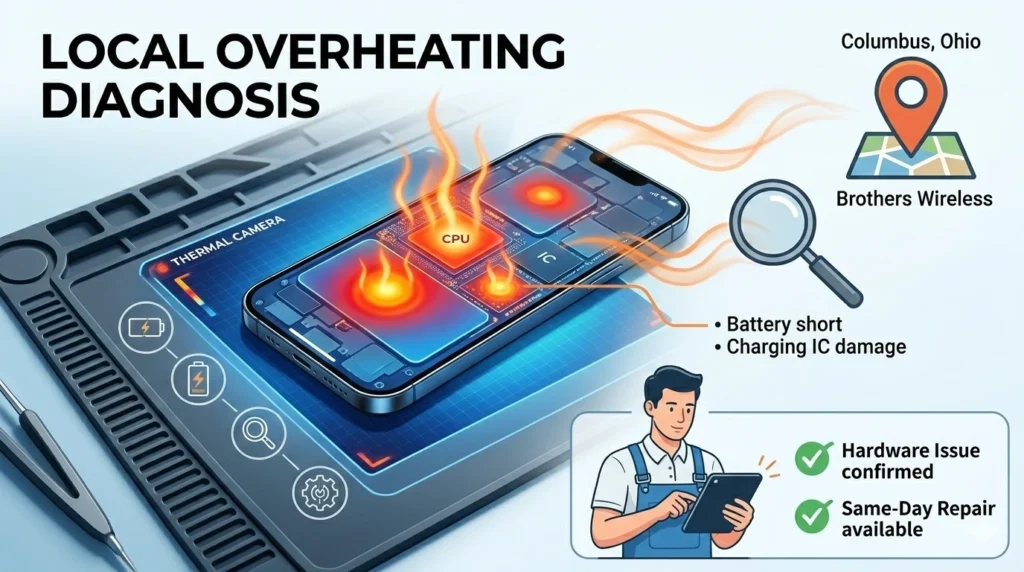
What if your phone is still hot after a restart? The problem might be deeper than software. If your smartphone’s overheating problem happens frequently, it may indicate deeper hardware issues.
- Battery Failure: The battery is shorting out internally.
- Motherboard Short: A tiny component is drawing too much power.
- Charging IC Damage: The chip that manages power is broken.
Estimated Repair Costs:
- Battery Replacement: Usually $50 – $100, depending on the model.
- Charging Port Repair: Usually $60 – $120.
Professional Phone Repair in Columbus, Ohio
Don’t let a hot phone ruin your day. Whether you need an iPhone battery replacement in Columbus or a Samsung repair, we are here to help.
We offer expert phone battery repair in Columbus. Our team knows exactly how to handle high-performance smartphones safely. We are conveniently located for those searching for phone repair near me or looking for help while shopping at Walmart.
How Technicians Diagnose Overheating
We use a professional process to keep your data safe:
- Battery Health Test: We check the capacity and cycle count.
- Thermal Camera Scan: We find “hot spots” on the motherboard.
- CPU Usage Analysis: We find rogue apps draining your power.
- Charging Port Inspection: We check for corrosion or debris.
Tips to Prevent Phone Overheating (Long-Term)
- Keep storage 20% free: A full phone works harder to move files, creating heat.
- Avoid gaming while charging: This is the #1 cause of battery wear.
- Keep phone out of sunlight: Always place your phone face down in the shade.
- Use original chargers: Cheap cables often lack heat regulation.
How Long Should It Take for a Phone to Cool Down?
Most smartphones cool down within 5–10 minutes after heavy use stops. If your phone stays hot for longer than 20 minutes in a cool environment, it may indicate a deeper hardware problem.
FAQ
Why is my phone running hot while charging?
This is often caused by faulty cables, fast charging, or using the phone while it’s plugged in.
Can overheating damage my phone battery?
Yes. High heat causes the lithium-ion cells to degrade, leading to poor battery life.
How hot is too hot for a phone?
Anything over 113°F (45°C) is dangerous and can lead to hardware failure.
Does fast charging cause heat?
Yes. Pushing more power into a battery always generates more heat than a slow charge.
Can phone cases cause overheating?
Yes. Thick rubber or leather cases act like insulation and prevent heat from escaping.
Is your phone still running hot?
If your phone keeps overheating, don’t ignore the warning signs. A damaged battery can become a serious safety risk. Visit Brothers Wireless in Columbus for a free battery health check and fast same-day repair. Most overheating issues can be diagnosed in minutes!