
Is your phone camera blurry? It is a frustrating problem. You want to capture a special moment. Instead, you get a fuzzy mess.
If you are wondering why my phone camera is blurry, you are not alone. This is a common issue for many smartphone users. Most of the time, the fix is simple. Other times, it might be a hardware problem.
This guide will show you how to fix blurry phone camera issues quickly. We will cover everything from simple cleaning to software resets. Let’s get your photos looking sharp again!
Quick Fixes for a Blurry Phone Camera
Before diving into deeper issues, try these quick solutions. These often solve the problem in seconds:
- Clean the camera lens: Use a soft cloth.
- Restart your phone: This clears small bugs.
- Tap the screen: Manually tell the phone where to focus.
- Remove your phone case: Sometimes cases block the lens.
- Update your software: Keep your OS current.
- Clear camera app cache: (For Android users).
- Check storage space: Full phones struggle to process images.
- Test another app: See if the blur happens in Instagram or Snapchat too.
Common Reasons Your Phone Camera Is Blurry
Understanding the cause helps you find the cure. Here are the top reasons for a smartphone camera’s blurry situation:
Heavy Fingerprints and Dirt
Our phones live in our pockets and hands. We touch the lenses constantly. Oils from your skin create a film. This film makes photos look hazy or “glowy.”
Camera App Cache Problems
Sometimes the camera app stores corrupted data. This makes the software lag. When the software lags, the auto-focus fails.
Low Storage Space
When your storage is full, the camera lacks “breathing room.” It may fail to process high-resolution images properly.
Third-Party App Conflicts
Some apps interfere with camera functionality. If your camera works in the main app but not in a third-party app, the app is the problem.
Dirty Protective Case
Cheap or old cases can block the lens slightly. Even a tiny bit of plastic in the way causes blur.
Low Light Conditions
In dark environments, the camera struggles to find a focus point. This leads to grainy or blurry shots.
How to Clean Your Phone Camera Lens Properly
Cleaning is the most searched topic for a reason. Most blur is just dirt! However, doing it wrong can cause scratches.
- Avoid alcohol wipes: These can strip the protective coating off the lens.
- Avoid paper towels: These are too rough and can leave micro-scratches.
- Use a Microfiber cloth: This is the gold standard for optics.
- Why it matters: Even a tiny smudge scatters light. Proper cleaning ensures light hits the sensor directly. This creates a crisp, clear image.
Software Fixes for Blurry Camera Problems
If the lens is clean, the problem might be “under the hood.” Try these phone camera blurry fix steps:
Restart Your Phone
A simple restart can fix temporary software glitches. It refreshes the system and stops rogue background tasks.
Update Your Operating System
New updates often include camera bug fixes. They improve the algorithms that help your phone focus.
Clear Camera App Cache (Android)
Go to Settings → Apps → Camera → Storage → Clear Cache. This removes old data that might be slowing down the app.
Reset Camera Settings
Open your camera app and look for the “Reset Settings” option. This returns the app to its factory state.
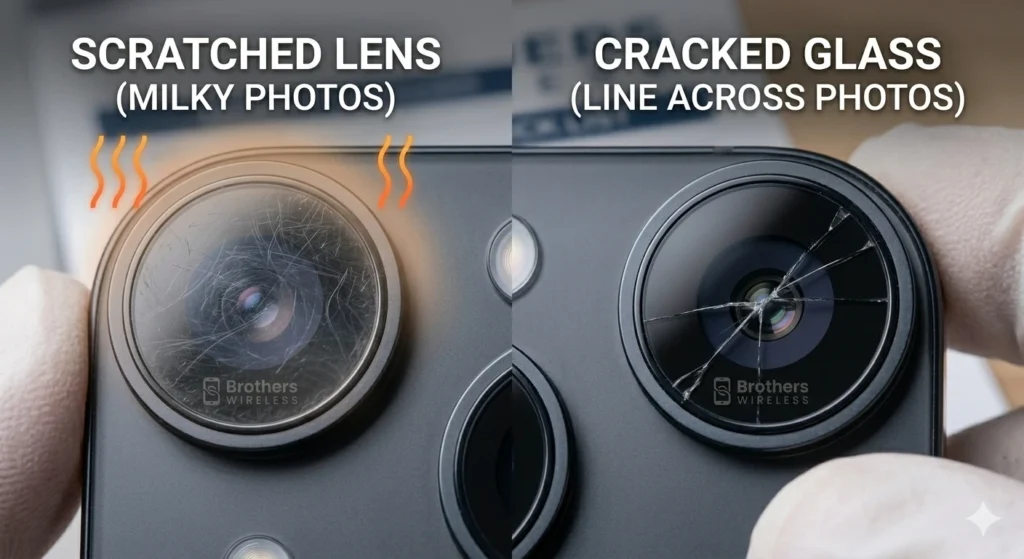
Scratched Lens vs. Cracked Camera Glass
A scratch is different from a crack. A scratched lens makes photos look milky or soft. A crack usually creates a distinct line across your photos. Both require professional attention to fix.
Internal Camera Problems
Sometimes the issue is inside the device.
- Camera sensor failure: The “eye” of the camera stops working.
- Loose camera module: A drop can knock the camera out of place.
- Dust inside the lens: Tiny particles can get trapped behind the glass.
- Damage from drops: Even if the glass isn’t broken, the focus motor can break.
How to Test If Your Camera Is Damaged
Is it a hardware issue? You can test it yourself:
- Open the front camera: Is it clear? If the back is blurry but the front is clear, the back hardware is likely the issue.
- Switch between lenses: Try the wide-angle or zoom lens.
- Check for black spots: If you see “ink” spots, your sensor is damaged.
When You Need a Camera Lens Replacement
If your photos are still blurry after cleaning and resetting, you likely need a replacement. A pro can swap the lens or the entire module.
Professional Camera Repair in Columbus, Ohio
Don’t let a blurry camera ruin your memories. If you are searching for phone repair near me, visit Brothers Wireless in Columbus.
We offer expert smartphone camera repair. Our team uses precision tools to fix your device safely. Proper sealing protects your phone against future dust. We use high-quality parts to ensure your photos look perfect again.
We are conveniently located near Walmart. Most camera repairs are fast and reliable!
Tips to Keep Your Phone Camera Clear
- Use a high-quality case: Ensure the lens cutout is large.
- Keep storage 20% free: This keeps the software fast.
- Wipe your lens daily: Make it a habit.
FAQ
Why is my phone camera blurry after dropping my phone?
The focus motor inside the lens is very delicate. A drop can break this motor, even if the glass looks fine.
Why are my photos blurry only at night?
Cameras need light to focus. In low light, the shutter stays open longer. Any tiny movement makes the photo blurry.
Can a cracked camera lens be repaired?
The glass cover can be replaced. If the internal sensor is cracked, the whole camera module must be swapped.
How long does phone camera repair take?
Most repairs take 30 to 60 minutes.
Is it expensive to fix a smartphone camera?
It is much cheaper than buying a new phone! Prices vary based on your model.
Conclusion
A blurry camera is no fun. Start with the quick fixes. Clean your lens with a microfiber cloth. Check your software for updates. If those don’t work, don’t worry.
If your camera hardware is damaged, we can help. Visit Brothers Wireless for a professional diagnostic. We will get your camera focusing like new again!